 Software Tool
Run Open Play Without the Paddle Rack
PadBoard decides who plays next, on which court, and with whom — fairly, in front of everyone, without anyone having to police a row of paddles. Built for pickleball clubs across the Philippines, it keeps score too, and it keeps working when the venue Wi-Fi doesn't.
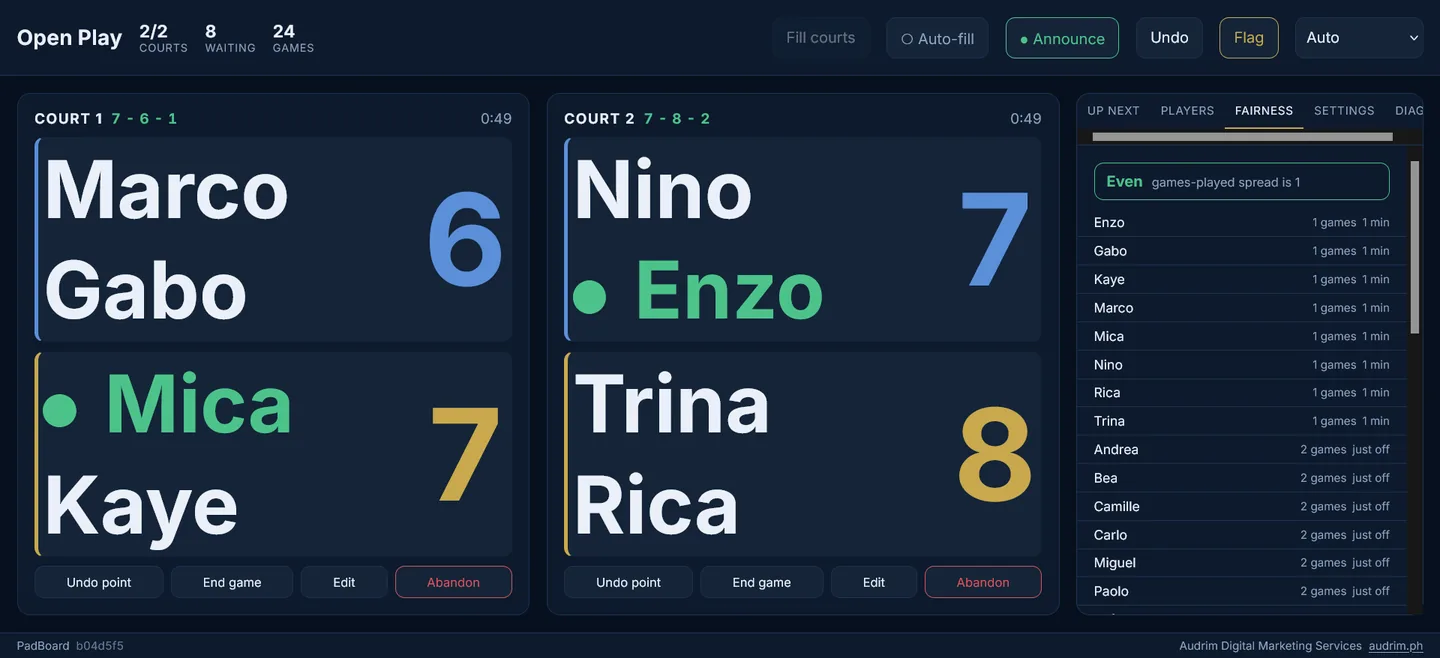
A Paddle Rack Can't Tell Who Has Been Waiting Longest
Every open play session runs on the same fragile system: a row of paddles on a fence. It works right up until someone moves a paddle that isn't theirs, the wind knocks the whole rack over, or the same four players end up on court together for the third time in a row while a beginner sits out twice.
None of that is anyone's fault. A rack of paddles has no way of knowing who has been waiting longest, who has already partnered whom, or whether a court is badly mismatched. It just holds paddles.
PadBoard is what a paddle rack would do if it could count.
Ask About PadBoardRead the quick guide — every control explained, printable on one sheet.
PadBoard tracks who has played, who has been waiting, and who has already partnered whom. When a court frees up it puts on the players who are owed a game — and among players who are equally owed one, it picks the pairing nobody has had recently.
Over a three-hour session, that means everyone's games-played count stays within one of everybody else's, and you stop seeing the same four faces on the same court all night.
Not every club runs open play the same way, so PadBoard doesn't insist. Use it as a straight digital paddle rack — first in, first out, exactly as your players already understand it. Or switch to fair rotation, skill tiers, winners split, challenge court, or round robin.
Winners split and challenge court both come with a hold limit, so a strong pair can't quietly occupy a court for an hour while everyone else watches.
Scoring is a dial, not a switch. Keep no score at all. Tap the winning team and nothing else. Or keep a full scoreboard — including proper side-out scoring with server numbers, court positions, and the score called out the way it should be: four, two, one.
That last part helps more than it sounds. Calling the score correctly is the single most confusing thing in pickleball for newer players, and PadBoard can do it for them — on screen and out loud.
Courts are not places with reliable Wi-Fi. PadBoard loads once and then runs entirely on your device — no connection needed to start a game, score a rally, or add a latecomer. Sign in once and it keeps working offline for a week.
If your tablet dies mid-session, nothing is lost. The session is saved continuously on the device and backed up to your ADMS account whenever there's a signal, so you can pick it up on another device and carry on.
Open play friction is almost always about fairness — who has been waiting, who keeps getting the good courts, who sat out twice. PadBoard has a screen for exactly that: games played, time waited, and consecutive sit-outs for everyone present.
It deliberately isn't a leaderboard. Win rates with random partners say very little, and posting them at a casual session creates the friction it's supposed to prevent. Standings exist, but they're off unless you turn them on.
PadBoard runs in a browser — a tablet propped on a bench, a laptop at the scorer's table, or a phone in your pocket. The layout adapts to whatever it's on, with player names sized to stay readable at a glance rather than squeezed to fit.
There's nothing to install and no separate account. Sign in to your ADMS client portal and PadBoard is there.
PadBoard — FAQ
How much does PadBoard cost?
₱250 a month for up to 4 courts, or ₱500 a month for up to 8 courts — the larger plan also adds saved rosters, session templates, and your club's name and logo on printed reports. Both are billed through your ADMS client portal, and there's no separate PadBoard account — your portal login is the login.
Does PadBoard work without internet at the venue?
Yes. PadBoard loads once and then runs entirely on your device — no connection needed to start a game, score a rally, or add a latecomer. It keeps working offline for about a week, and backs up to your account automatically once there's a signal again.
Do players need to install anything?
No. One host runs PadBoard from a tablet, laptop, or phone at the court. Players don't install anything or create an account of their own.
How is PadBoard different from a free rotation app?
Free open-play apps exist, and for a casual one-off session they can be enough. PadBoard adds six rotation modes including skill tiers and challenge court, proper side-out score-calling, a week of offline resilience with automatic backup, and support through the same ADMS portal your club may already use.
Is there a free trial?
There's no self-serve free trial yet. Message us about your club through the contact page and we can figure out what makes sense.
Running an Open Play Session?
PadBoard is available as a subscription through the ADMS client portal. Tell us about your club and we'll set you up.
Ask About PadBoard